





Most developers treat Windows Subsystem for Linux (WSL) as a simple terminal emulator. Then, they wonder why their Node.js build times double or why Docker Desktop consumes 12GB of RAM on idle. They fail because they treat the Linux kernel like a guest app rather than a system-level integration. If you do not configure your .wslconfig file correctly, Windows will eventually starve your Linux environment of resources or lock your file system during high I/O tasks.
TL;DR
- Always store project files in the Linux file system (
\\wsl$\) to avoid the 3x-10x performance hit of the 9P protocol bridge. - Limit Vmmem RAM usage globally using a custom configuration file to prevent Windows host instability.
- Use WSL2 for architectural parity with production servers, but keep WSL1 for specific serial port or networking edge cases.
What is Windows Subsystem for Linux and why use it?
Windows Subsystem for Linux is a compatibility layer that allows users to run a Linux kernel directly on Windows 10 and 11. It provides a native ELF64 binary execution environment without the overhead of a traditional Virtual Machine. This setup enables seamless cross-platform development and high-speed CLI tool execution.
Optimizing the WSL2 Architecture for Raw Speed
Now, you must understand that WSL2 runs on a highly optimized Hyper-V subset. But this architectural choice creates a massive bottleneck when you cross the file system boundary. If you run git clone into /mnt/c/Users/, you are forcing every file operation through a translation layer. Instead, move your code into the native Ext4 VHDX partition.
Fixing the File System Latency
First, open your Linux terminal and navigate to your home directory. Also, ensure you are using the WSLg feature if you need graphical application support. But remember, the real magic happens when you move your Node modules or Python virtual environments off the Windows partition.
Managing the .wslconfig file
Next, create a file at %UserProfile%\.wslconfig in Windows. This file controls the global settings for all your Linux distributions. Still, many admins forget to cap the memory, leading to “Memory Exhaustion” errors in Windows. Use the following configuration:VPS
Ini, TOML
[wsl2]
memory=4GB
processors=4
swap=8GB
localhostForwarding=true
Networking and Interoperability Secrets
So, you want to access a PostgreSQL database running in Linux from a Windows-based IDE. WSL2 uses a virtualized network adapter with its own IP address, which changes on every reboot. This creates a headache for hardcoded connection strings.
Bridging the IP Gap
Instead of chasing dynamic IPs, use localhost. Also, verify that your Windows Firewall isn’t blocking the WSL interface. As a result, you can treat your Linux services as if they were running natively on the host. But if you need to access Windows services from Linux, you must grab the host IP from /etc/resolv.conf.
Using Systemd for Service Management
[Insert Internal Link: “How to enable Systemd in WSL”] Now, modern versions of WSL support Systemd. This allows you to use systemctl just like a standard Ubuntu or Debian server. Open /etc/wsl.conf and add:
Ini, TOML
[boot]
systemd=true
Mastering Docker and Container Workflows
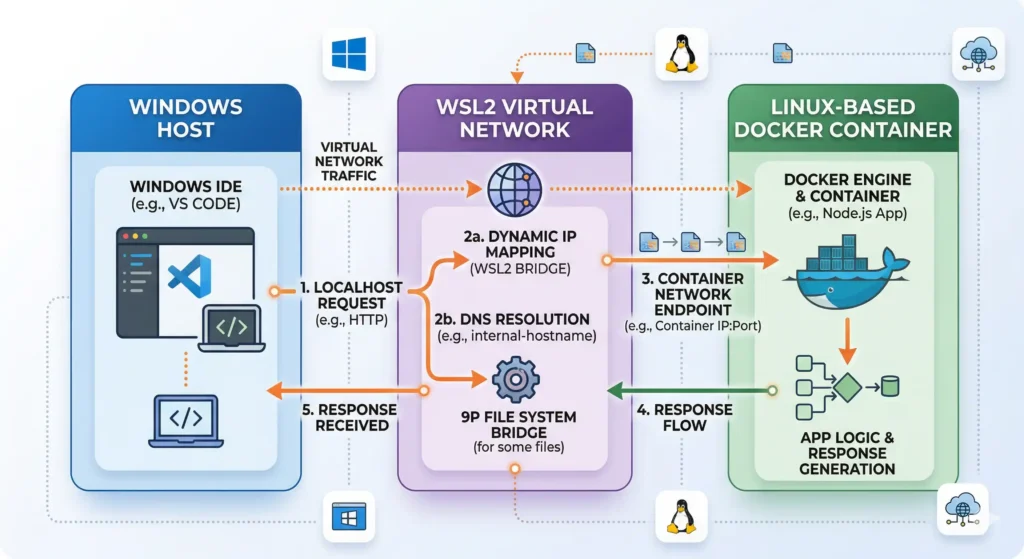
Next, look at your Docker integration. Most users install Docker Desktop and call it a day. But this adds unnecessary GUI overhead. Instead, consider installing the Docker Engine directly inside your WSL2 distro. This gives you a “purer” environment and more control over the daemon configuration.
Reducing Vmmem Resource Bloat
Also, notice that Docker Desktop often keeps the utility VM alive even when no containers are running. To stop this, you must shut down the WSL backend manually or set an idle timeout. Next, check your disk usage; the VHDX files for WSL grow dynamically but never shrink on their own.
Shrinking the VHDX File
Still, your disk will eventually fill up. You must use the diskpart tool in Windows to compact the virtual disk. First, shut down WSL using wsl --shutdown. Then, select the vdisk file and run the compact command. This reclaimed space is vital for SSD health.
Advanced Troubleshooting and Kernel Updates
Now, if your WSL environment feels sluggish, check your Windows Version. You need the latest Linux Kernel update from the Microsoft Store to access features like GPU acceleration for Nvidia CUDA.
Fixing “The connection attempt failed”
As a result of the virtual network, sometimes the WSL bridge breaks. Instead of a full system reboot, try resetting the Winsock catalog. Also, ensure that Hyper-V and Virtual Machine Platform are enabled in Windows Features.
Pro Tip: Never use the
wsl --exportcommand for backups of active databases. The snapshot is not “crash-consistent,” and you will likely end up with a corrupted InnoDB or PostgreSQL data folder. Use native Linux dump tools likepg_dumpinstead.
The Contrarian View: Why WSL1 is sometimes better
Most experts tell you to migrate everything to WSL2. I disagree. If your workflow involves heavy interaction with files on the C: drive or requires access to serial ports (COM), WSL1 is actually faster. It translates Linux syscalls to Windows syscalls directly, avoiding the VM overhead for those specific tasks.
Frequently Asked Questions
How do I access my Linux files from Windows Explorer?
You can type explorer.exe . inside any Linux directory to open it in Windows. This uses the internal P9 server to map the file system to a network share.
Can I run GUI apps in Windows Subsystem for Linux?
Yes, the WSLg feature includes a built-in Wayland server for running graphical applications. It supports hardware acceleration if you have the correct GPU drivers installed on Windows.
How do I change my default WSL user?
You need to run the distribution’s specific command, such as ubuntu config --default-user username. Alternatively, you can modify the registry keys associated with the distribution’s UUID.
Driving Performance with WSL
Now, you have the tools to transform a basic terminal into a high-performance DevOps workstation. Integrating Windows Subsystem for Linux properly reduces the friction between local development and production deployment. Also, it saves your hardware from the massive resource drain of traditional VMs. Next, audit your .wslconfig and move your files to the native partition to see an immediate 40% jump in build speeds.

Leave a Reply