How to Choose the Best Singapore VPS Hosting for Your Website
Choosing the right VPS location is one of the most important decisions you make before hosting a website, application, online store, VPN, or remote desktop server. Many people compare only the price, RAM, CPU, and storage, but the server location can affect how fast your users connect to your website and how smooth your application feels during real use.
If your audience is in Singapore, Malaysia, Indonesia, Thailand, Vietnam, the Philippines, or other parts of Southeast Asia, Singapore VPS hosting can be a strong option. Singapore is one of the most preferred server locations in Asia because it sits close to major regional markets and often provides good connectivity across Southeast Asia.
A Singapore VPS gives you more control than shared hosting. You get dedicated VPS resources, root or administrator access, operating system flexibility, and the ability to configure the server for your own workload. This makes it suitable for business websites, WordPress, WooCommerce, SaaS apps, remote desktop, private VPNs, developer projects, and internal company tools.
TL;DR
A Singapore VPS is a good choice if your website, app, or server workload needs fast access for users in Singapore or nearby Southeast Asian countries. It is useful for business websites, WordPress, eCommerce, SaaS dashboards, APIs, remote desktop, VPN servers, and agency hosting.
Before choosing VPS hosting in Singapore, look at your audience location, operating system needs, CPU and RAM requirements, SSD or NVMe storage, bandwidth, backup options, security controls, support quality, and upgrade flexibility.
For Singapore-focused projects, you can review AwakeHost Singapore VPS hosting if you need a VPS location suitable for Southeast Asian users, dedicated resources, and full server control.
What Is Singapore VPS Hosting?
Singapore VPS hosting means your virtual private server is hosted in a Singapore-based or Singapore-focused server location. A VPS gives you a private server environment with allocated CPU, RAM, storage, and operating system access.
This is different from shared hosting. On shared hosting, many users share the same server environment, and you usually have limited control over software, server settings, and resource usage. With a VPS, you get more freedom. You can install applications, configure firewalls, manage databases, run websites, set up a control panel, host APIs, or use the server as a remote desktop machine.
A Singapore VPS server is useful when your visitors or users are located in Singapore or nearby Asian markets. The closer your server is to your audience, the better the connection can feel, especially for dynamic websites and applications that need frequent server communication.
Why Singapore Is a Popular VPS Location
Singapore is a common VPS location because it is geographically useful for Southeast Asia. If your users are spread across countries like Singapore, Malaysia, Indonesia, Thailand, Vietnam, Cambodia, the Philippines, and parts of South Asia or East Asia, a Singapore server can often provide a balanced regional location.
For many website owners, Singapore works well because it is not limited to one country audience. A business may be based in Singapore but serve customers in Malaysia and Indonesia. A SaaS platform may have users across Southeast Asia. A remote team may need a stable server location that works reasonably well for several nearby countries.
This is why Singapore VPS hosting is often chosen for regional projects. It can be useful when you do not want to host too far away from your main Asian users.
Who Should Choose a Singapore VPS Hosting?
A Singapore VPS is suitable for users who need better control, stronger performance, and a server location close to Southeast Asia.
You may need VPS hosting in Singapore if you run a business website targeting Singaporean users, manage a WordPress or WooCommerce store, build a SaaS platform for Southeast Asia, host client websites as an agency, use Windows Remote Desktop, set up a private VPN, run an API or backend service, or need a development server close to Asian users.
It is also useful for companies that have customers in multiple nearby countries. For example, a website serving users in Singapore, Malaysia, and Indonesia may benefit more from a Singapore VPS than a server hosted far away in Europe or North America.
The main idea is simple. Choose Singapore when your users are close to Singapore, your business operates in Southeast Asia, or your application needs better regional response times.
Why Server Location Matters for Speed
Every time someone opens your website or app, their device sends a request to your server. The distance and network path between the user and the server affect latency. Latency is the delay before data starts moving between the visitor and your server.
For static websites, a CDN can help serve images, CSS, JavaScript, and cached pages from different locations. But many websites are not fully static. WordPress dashboards, WooCommerce checkout pages, customer login areas, SaaS dashboards, APIs, booking systems, and remote desktop sessions still depend heavily on the origin server.
This is where a Singapore VPS can help. If your users are in Singapore or nearby Southeast Asian countries, hosting your server in Singapore may reduce the time it takes for requests to reach the server. That can make websites feel faster and applications more responsive.
For business websites, this can improve user experience. For online stores, it can make checkout smoother. For SaaS platforms, it can make dashboards feel less delayed. For remote desktop, it can make mouse movement and screen updates feel more natural.
Singapore VPS Hosting vs Shared Hosting
Shared hosting can work well for small websites, simple blogs, and low-traffic pages. It is affordable and easy to start with. But shared hosting becomes limiting when your website grows or when you need more control over the server.
A Singapore VPS is a better choice when you need dedicated resources, custom software, server-level access, better isolation, and more flexible performance tuning.
With shared hosting, you may not be able to change server settings, install custom services, configure advanced caching, run background workers, or manage security rules the way you want. With VPS hosting, you have far more control over the environment.
This matters for serious WordPress websites, WooCommerce stores, SaaS apps, business tools, development projects, and agency hosting. If your website is important for sales, leads, customer access, or daily operations, VPS hosting usually gives you a stronger foundation than shared hosting.
You can also review AwakeHost’s main VPS hosting page if you want to compare VPS hosting more broadly across different needs and locations.
Linux VPS or Windows VPS in Singapore?
The operating system should match your actual workload. A common mistake is choosing Windows because it feels familiar, even when the project would run better on Linux.
A Linux VPS in Singapore is usually the better option for websites, WordPress, PHP applications, Laravel, Node.js, Python, databases, APIs, control panels, and most web hosting tasks. Linux is lightweight, stable, and widely used for server environments. It also works well with web servers such as Nginx and Apache, databases like MySQL and MariaDB, and hosting panels such as cPanel, Plesk, CyberPanel, Webmin, or DirectAdmin.
A Windows VPS in Singapore is better when your work specifically needs Windows. This includes Remote Desktop, Windows-only software, ASP.NET applications, Microsoft SQL Server, browser-based remote work, accounting tools, or software testing on a Windows environment.
For most websites, choose Linux. For remote desktop or Windows applications, choose Windows. The right choice depends on the software you need to run, not only personal preference.
How Much CPU and RAM Do You Need?
The right VPS size depends on your workload. A small business website does not need the same resources as a WooCommerce store, SaaS application, or Windows remote desktop server.
For a small website or personal blog, 1–2 GB RAM may be enough. For a business WordPress site, 2–4 GB RAM is a better starting point. For WooCommerce, membership websites, learning platforms, or websites with heavy plugins, 4–8 GB RAM is more practical. For SaaS apps, customer dashboards, API servers, or database-heavy workloads, you may need 4–8 GB RAM or more depending on active users and background tasks.
Windows VPS usually needs more RAM than Linux because the operating system itself uses more resources. For light remote desktop use, 4 GB RAM may work. For smoother use with multiple applications or browser tabs, 8 GB RAM or more is usually better.
CPU matters when your server processes requests, runs database queries, handles scripts, compresses files, serves dynamic pages, or runs background jobs. RAM matters when your applications, database, caching system, and operating system need memory to run smoothly.
The safest approach is to choose a plan that fits your current workload but also allows upgrades. A VPS should not only work today. It should give your website or app room to grow.
Why SSD or NVMe Storage Matters
Storage is not only about space. The type of storage affects how quickly your server can read and write data.
For VPS hosting, SSD or NVMe storage is much better than older mechanical storage. Faster storage can improve database response, WordPress admin speed, file operations, application performance, and backup or restore tasks.
This is especially important for websites that use databases heavily. WordPress, WooCommerce, forums, learning platforms, SaaS dashboards, CRM tools, and custom applications all depend on database performance. If the storage is slow, the whole website can feel slow even when CPU and RAM look good.
When comparing Singapore VPS plans, check both the storage size and storage type. More storage is useful, but fast storage is often more important for performance-focused websites and applications.
Bandwidth and Network Quality
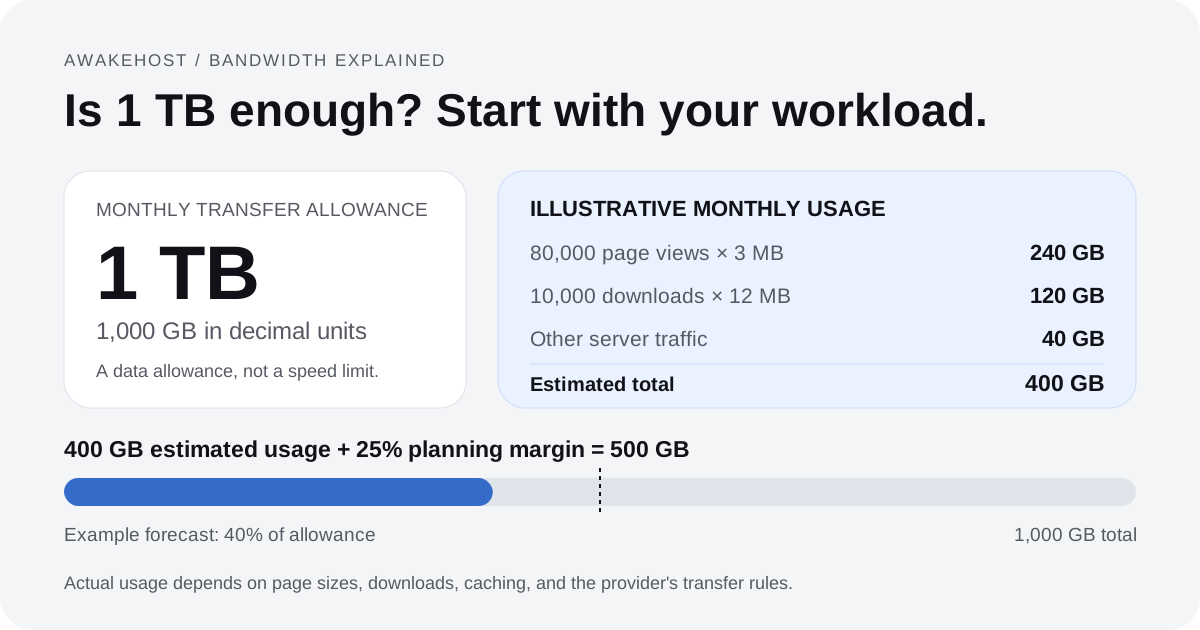
Bandwidth decides how much data your VPS can send and receive. Network quality decides how stable and smooth that data transfer feels for users.
For a Singapore VPS, bandwidth becomes important if you host image-heavy websites, file downloads, software updates, video content, game servers, API-heavy apps, or high-traffic websites. A small business website may not use a lot of bandwidth, but an eCommerce store, SaaS app, or media-heavy website can use more than expected.
You should also check how the hosting provider explains bandwidth limits. Some providers advertise large or unlimited bandwidth but still apply fair usage rules. Others clearly define monthly transfer limits, port speed, and what happens if you exceed the limit.
For professional projects, clarity matters. You should know how much bandwidth is included, whether there are restrictions, and how easily you can upgrade if your traffic grows.
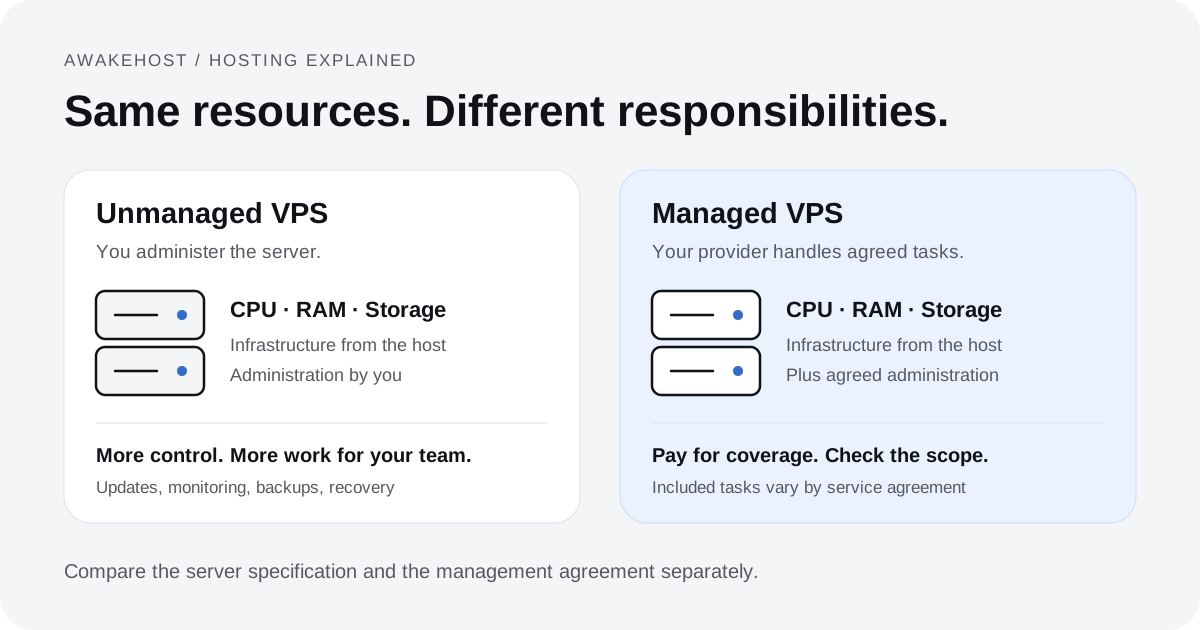
Managed or Unmanaged Singapore VPS Hosting?
A Singapore VPS can be managed or unmanaged. This choice affects how much server responsibility you take on.
An unmanaged VPS gives you full control, but you are responsible for setup, updates, software installation, firewall rules, backups, troubleshooting, and security. This is a good choice for developers, system administrators, technical users, and agencies that already know how to manage servers.
A managed VPS is better if you want help with server-related tasks. The exact level of support depends on the provider, so it is important to read what “managed” actually includes. Some managed services cover basic server issues, while others help with deeper setup, optimization, migrations, and troubleshooting.
If you are not comfortable with Linux commands, firewall settings, server updates, or security hardening, do not choose unmanaged VPS only because it is cheaper. The lower price may cost more later if the server breaks, gets compromised, or is not configured properly.
Security Features to Check
A VPS gives you control, but it also gives you responsibility. Security should be part of your decision before you buy, not something you think about after a problem happens.
For a Singapore VPS, check whether you can configure firewall rules, use SSH keys, reset or reinstall the operating system, manage passwords safely, create backups or snapshots, and secure the client account with strong login protection.
For Linux VPS, use SSH keys where possible, disable unnecessary services, keep packages updated, and configure a firewall. For Windows VPS, use strong administrator passwords, limit RDP exposure where possible, keep Windows updated, and avoid installing unknown software.
If you host customer data, payment-related websites, internal tools, or business dashboards, security becomes even more important. A VPS gives you the flexibility to secure the server properly, but it does not secure itself automatically.
Backup and Snapshot Options
Backups are one of the most important parts of VPS hosting. Many users ignore backups until a website breaks, a database gets corrupted, a plugin update fails, or files are accidentally deleted.
A good VPS setup should include a backup plan. This may include provider-level backups, manual snapshots, control panel backups, database backups, and off-server backups stored in a separate location.
Do not rely only on a backup stored inside the same VPS. If the server becomes inaccessible, that backup may also become inaccessible. For important websites and applications, keep at least one independent backup outside the server.
Backups are not only for disasters. They also help during migrations, updates, experiments, and security recovery.
Data Location and Compliance Considerations
Singapore is often chosen by businesses that want an Asia-based server location. This can be useful for companies serving users in Singapore or Southeast Asia.
However, server location alone does not solve every privacy, legal, or compliance requirement. You still need to consider what data you collect, how you store it, who can access it, how backups are handled, and what rules apply to your business or industry.
For normal websites, this may be simple. For finance, healthcare, legal, customer records, or sensitive business data, you should be more careful and seek proper professional advice where needed.
A Singapore VPS gives you infrastructure control, but correct data handling is still your responsibility.
When a Singapore VPS Hosting Is a Good Choice
A Singapore VPS is a good choice when your audience is in Singapore or nearby Southeast Asian countries. It also makes sense when your business operates in Asia and you want a server location that works well for regional visitors.
It is especially useful for WordPress websites, WooCommerce stores, SaaS apps, APIs, remote desktop, private VPNs, business dashboards, developer projects, and agency hosting. These workloads often need more control than shared hosting and better regional response than a far-away server.
Choose Singapore VPS hosting when location, control, and scalability all matter to your project.
When You Should Not Choose a Singapore VPS Hosting
A Singapore VPS is not always the best option. If most of your users are in the United States, Europe, the Middle East, or Australia, another VPS location may provide better latency for those users. It may also be unnecessary if you only have a small static website with very low traffic and no special server requirements. In that case, shared hosting or static hosting may be enough.
You should also avoid unmanaged VPS if you do not want to handle server updates, firewall setup, backups, and troubleshooting. VPS hosting gives more power, but it also requires more responsibility.
The best VPS location is the one that fits your audience and workload. Choose Singapore when Southeast Asia matters.
Singapore VPS Hosting for WordPress and WooCommerce
WordPress is one of the most common reasons users move to VPS hosting. A Singapore VPS can be a good option for WordPress websites that target Singapore or Southeast Asia.
With VPS hosting, you can control PHP settings, caching, database configuration, SSL, backups, cron jobs, and security rules. This is useful for WordPress sites with page builders, WooCommerce, booking systems, membership plugins, multilingual content, or regular traffic.
WooCommerce needs even more attention because cart, checkout, account pages, filters, and order management are dynamic. A CDN can help with static files, but checkout and database actions still rely on the origin server. For a Southeast Asia-focused store, Singapore VPS hosting can provide better regional performance and more control over the hosting environment.
Singapore VPS Hosting for SaaS Apps and APIs
A Singapore VPS can also be useful for SaaS platforms, customer dashboards, APIs, and backend systems. If your users are in Southeast Asia, hosting closer to them can make the application feel more responsive.
Developers can use a VPS to run Node.js, Laravel, Django, Flask, Next.js, PostgreSQL, MySQL, Redis, background workers, cron jobs, and API services. This gives more flexibility than shared hosting and can be simpler than managing a complex cloud setup at the early or mid-stage of a project.
For SaaS and API workloads, focus on CPU, RAM, storage speed, network quality, backups, monitoring, and upgrade options. A cheap VPS with weak resources may work during testing but struggle once real users start using the app.
Singapore VPS for Remote Desktop and VPN
A Windows VPS in Singapore can be used for Remote Desktop access. This is useful for remote workers, browser-based tasks, Windows software, account management, testing, and business tools that need an always-online Windows environment.
A Linux VPS in Singapore can also be used to set up a private VPN with tools such as WireGuard or OpenVPN. This can help teams create secure remote access or test websites and apps from a Singapore-based server endpoint.
Both use cases need proper security. Remote desktop should not be left exposed with weak passwords, and VPN servers should be updated and configured carefully.
What to Look for in the Best Singapore VPS Provider
The best Singapore VPS Hosting provider should offer a location that fits your audience, clear VPS resources, SSD or NVMe storage, Linux and Windows options, root or administrator access, transparent bandwidth limits, backup options, security controls, upgrade flexibility, and responsive support.
Do not choose only by the lowest price. A very cheap VPS may have weak CPU performance, slow storage, poor support, unclear bandwidth limits, or limited upgrade options.
For serious websites and applications, the better choice is usually the VPS that gives you stable performance, enough resources, clear terms, and room to grow.
AwakeHost Singapore VPS Hosting Overview
AwakeHost offers VPS hosting options for users who need dedicated resources, full server control, and flexible operating system choices. For Southeast Asia-focused projects, the AwakeHost Singapore VPS Hosting is the main place to review available plans and features.
A Singapore VPS Hosting can be used for WordPress, WooCommerce, business websites, remote desktop, private VPNs, SaaS apps, APIs, databases, agency hosting, and internal tools.
For broader VPS options and other locations, you can also visit the main AwakeHost VPS hosting page.
The best plan depends on your workload. A simple website, a Windows remote desktop, and a SaaS platform do not need the same amount of CPU, RAM, storage, or bandwidth.
Final Thoughts
Singapore VPS hosting is a strong choice when your website, app, business tool, or remote server needs good access for Singapore or Southeast Asian users. It gives you more control than shared hosting, better flexibility for software installation, and dedicated VPS resources for growing projects. It can support WordPress, WooCommerce, SaaS platforms, APIs, remote desktop, VPNs, agency hosting, and private business systems.
Before choosing a plan, think about your audience location, operating system, resource needs, bandwidth, storage type, backups, security, support, and upgrade path. A VPS should not only match your project today. It should also support where your project is going next. For Singapore-focused hosting needs, you can review the available options on the AwakeHost Singapore VPS hosting page.
FAQs
What is Singapore VPS hosting?
Singapore VPS hosting is a virtual private server service suitable for websites, apps, remote desktop, VPNs, and business tools that need a Singapore or Southeast Asia server location. It gives you dedicated VPS resources and more control than shared hosting.
Is Singapore VPS Hosting good for WordPress?
Yes, Singapore VPS hosting can be a good choice for WordPress websites targeting Singapore or Southeast Asia. It gives you more control over PHP settings, caching, database performance, security, backups, and server resources.
Should I choose Linux or Windows VPS in Singapore?
Choose Linux VPS if you want to host websites, WordPress, PHP apps, databases, APIs, or control panels. Choose Windows VPS if you need Remote Desktop, Windows-only software, ASP.NET, Microsoft SQL Server, or Windows-based business tools.
Is Singapore VPS Hosting good for Southeast Asian users?
Yes, a Singapore VPS Hosting is often a good option for users in Singapore, Malaysia, Indonesia, Thailand, Vietnam, the Philippines, and nearby regions because Singapore is a practical server location for many Southeast Asian audiences.
Can I use Singapore VPS Hosting for WooCommerce?
Yes, a Singapore VPS Hosting can be useful for WooCommerce stores, especially if your customers are in Singapore or nearby Asian countries. WooCommerce needs reliable server resources because checkout, cart, account pages, and order management are dynamic.
Can I use a Singapore VPS Hosting for remote desktop?
Yes, a Windows VPS in Singapore can be used for Remote Desktop access. It is useful for remote work, Windows software, browser tasks, testing, and business tools that need an always-online server.
Is Singapore VPS better than shared hosting?
Singapore VPS hosting is better than shared hosting when you need dedicated resources, full server access, custom software, stronger isolation, better control over performance, and more flexible security settings.
How much RAM do I need for a Singapore VPS Hosting?
For a small website, 1–2 GB RAM may be enough. For a business WordPress site, 2–4 GB RAM is a better starting point. For WooCommerce, SaaS apps, remote desktop, or multiple websites, 4–8 GB or more is usually recommended.
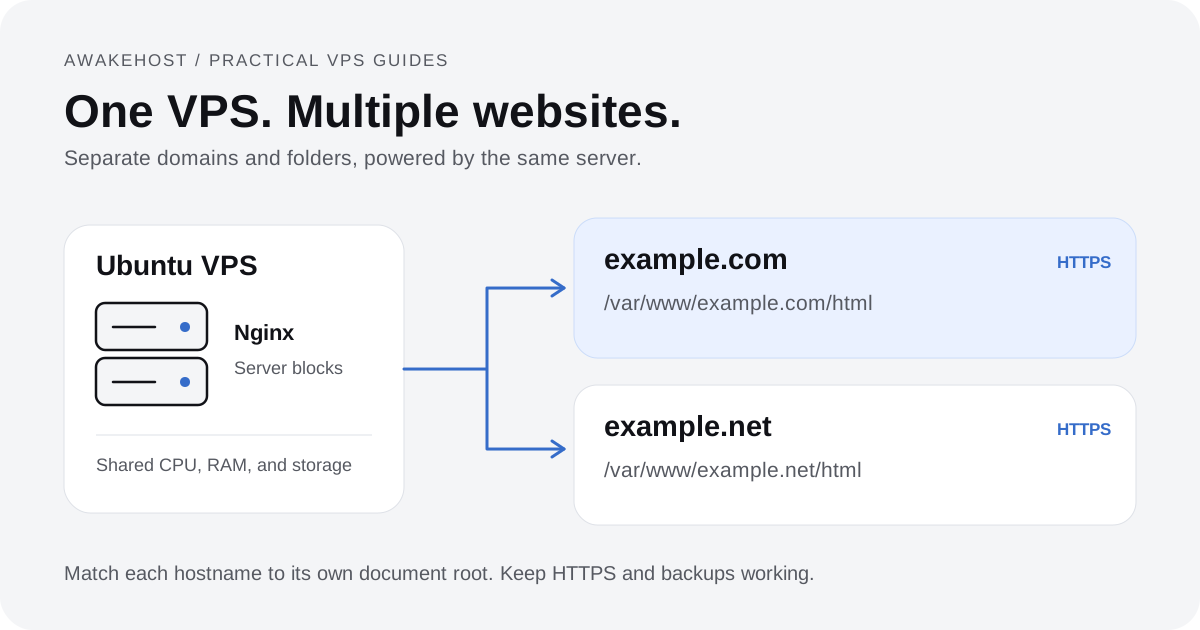
Can I host multiple websites on one Singapore VPS Hosting?
Yes, you can host multiple websites on one Singapore VPS Hosting if the server has enough CPU, RAM, storage, and bandwidth. A control panel can make it easier to manage domains, SSL certificates, databases, email, and backups.
When should I not choose a Singapore VPS Hosting?
You may not need a Singapore VPS Hosting if most of your users are outside Asia, if you only need a very small static website, or if you do not want to manage server updates, backups, firewall rules, and security settings.