VPS Bandwidth Explained: Is 1 TB Enough for Your Website?
You're comparing VPS plans and find one that offers 1 TB of bandwidth per month. The CPU and RAM look suitable, the price fits your budget, but what does 1 TB actually mean for your website?
Will it handle 10,000 visitors? What about 100,000? And what happens if your website uses more bandwidth than your plan allows?
The answer depends less on visitor numbers than you might expect.
A lightweight website with 100,000 monthly page views could use less bandwidth than a video-heavy website receiving just 10,000. Images, downloadable files, caching, and background applications all affect how much data your server sends.
For many small business websites, blogs, and moderately busy WordPress sites, 1 TB of monthly VPS bandwidth can be enough. Websites serving large downloads, high-resolution media, or substantial uncached traffic may need considerably more.
Here's how VPS bandwidth works, what 1 TB can realistically support, and how to estimate your requirements before choosing a hosting plan.
What Is VPS Bandwidth?
VPS bandwidth describes the network capacity available to a virtual private server. Hosting companies commonly use the term to describe the amount of data your VPS can transfer during a billing period.
Strictly speaking, bandwidth and data transfer are different measurements.
Bandwidth refers to how much data a network connection can carry per second. It is commonly measured in megabits per second (Mbps) or gigabits per second (Gbps).
Data transfer measures how much information moves between your server and other devices. Hosting plans typically express this allowance in gigabytes (GB) or terabytes (TB) per month.
When a VPS provider advertises 1 TB bandwidth, it usually means a monthly data transfer allowance, not the speed of the network connection.
Consider a website with product photographs.
Every time someone visits a page, their browser may download HTML, CSS, JavaScript, images, and other resources.
If those files are delivered directly from your VPS, they contribute to the server's outgoing traffic.
The more data your server sends, the more of your monthly transfer allowance you consume.
Bandwidth isn't limited to website visitors, either. File downloads, API responses, software updates, and transfers to external services may also contribute, depending on the provider's billing policy.
How Much Is 1 TB of VPS Bandwidth?
All calculations below use decimal units: 1 TB equals 1,000 GB, or 1,000,000 MB. The NIST guide to binary prefixes explains how decimal and binary units differ.
Some hosting providers use binary units or display transfer allowances differently. A tebibyte (TiB), for example, contains 1,024 gibibytes (GiB). Check your provider's definition if you're calculating close to the allowance.
Spread across a 30-day month, 1 TB works out to approximately:
| Period | Data transfer |
|---|---|
| Per month | 1,000 GB |
| Per week | 233 GB |
| Per day | 33.3 GB |
| Per hour, averaged over the month | 1.39 GB |
These are averages, not necessarily daily or hourly limits.
A website might transfer 10 GB on Monday and 80 GB on Friday without exceeding a 1 TB monthly allowance, provided its total usage remains within the provider's rules.
The important question is how much data each visit generates.
How Many Website Visitors Can 1 TB Handle?
There's no universal visitor limit because people browse websites differently.
Someone might open one page and leave. Another person might read twelve articles, browse a product catalog, and download several files.
A better starting point is to estimate bandwidth per page view.
The following table assumes each page view causes the specified amount of data to be transferred directly from your VPS.
| Average transfer per page view | Approximate page views with 1 TB |
|---|---|
| 500 KB | 2,000,000 |
| 1 MB | 1,000,000 |
| 2 MB | 500,000 |
| 3 MB | 333,000 |
| 5 MB | 200,000 |
| 10 MB | 100,000 |
These figures are mathematical estimates, not performance guarantees. They exclude additional server traffic, protocol overhead, and any difference between the measured page size and the data actually billed by the host.
They also represent page views, not unique visitors.
If a visitor opens five pages, that's five page views. If those pages each require 2 MB from your VPS, the session could generate roughly 10 MB of outgoing transfer.
Browser caching and CDN delivery may reduce the amount your origin VPS sends.
The table illustrates why visitor counts alone are unreliable when selecting a VPS bandwidth limit.
How to Calculate Your Website's Monthly Bandwidth Usage
You don't need an advanced monitoring system to make an initial estimate.
Start with three figures:
- Your expected monthly page views.
- The average amount of data your VPS delivers per page view.
- Other traffic generated by downloads, APIs, backups, and applications.
Use this formula:
Monthly transfer (GB) = Monthly page views × Average MB transferred per page view ÷ 1,000
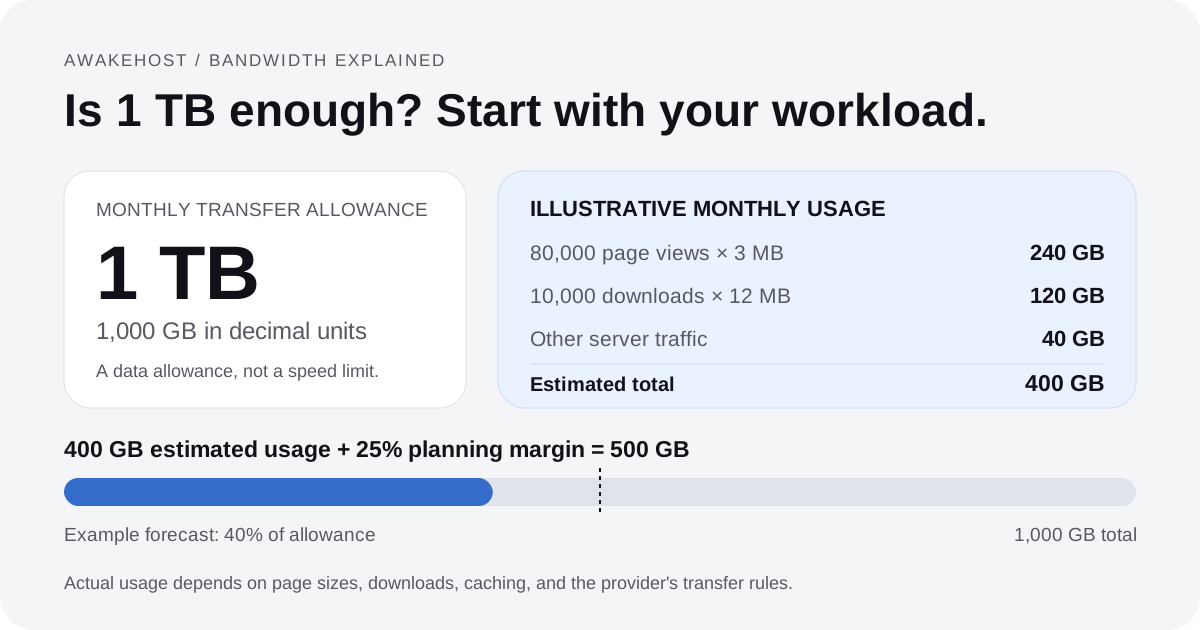
For example, imagine your website receives 80,000 page views each month, with an average of 3 MB delivered from your VPS per page view.
The calculation is:
80,000 × 3 MB = 240,000 MB
That's approximately 240 GB of monthly transfer.
Now suppose your visitors also download 10,000 PDF files each month. Each file is 12 MB.
10,000 × 12 MB = 120,000 MB
That's another 120 GB.
You also expect 40 GB of miscellaneous server traffic.
Your estimated usage becomes:
| Traffic source | Monthly transfer |
|---|---|
| Website page views | 240 GB |
| PDF downloads | 120 GB |
| Other server traffic | 40 GB |
| Estimated total | 400 GB |
If you add a 25% planning margin, the estimated requirement becomes 500 GB.
In this situation, a 1 TB VPS allowance would provide substantial room for traffic variation.
Leave Some Bandwidth Available for Unexpected Traffic
Planning around 100% of your monthly allowance leaves little flexibility.
A marketing campaign, product launch, popular article, or unexpected spike in downloads can increase usage quickly.
One planning approach is to keep forecast usage around 70–80% of the monthly allowance. That leaves room for traffic spikes and errors in your estimate. Use a larger margin when your traffic is harder to predict.
That means planning for approximately 700–800 GB on a 1 TB plan.
This isn't a technical requirement or a rule imposed by hosting providers. It's simply a precaution against forecasting errors and changing traffic patterns.
If your website regularly approaches the limit, investigate what is consuming the bandwidth before upgrading.
How Much VPS Bandwidth Do Different Websites Need?
The type of website matters as much as its traffic.
A blog, an online store, and a video library can all receive the same number of visitors while generating very different amounts of data transfer.
Small Business Websites
A typical business website might contain a homepage, service pages, a portfolio, and a contact form.
If most pages are lightweight and traffic is modest, its monthly transfer requirements may be relatively low.
For example, 20,000 page views at an average of 2 MB per page view would generate approximately 40 GB, assuming that data comes from the VPS.
A 1 TB allowance would leave plenty of room in this example.
Of course, a company website filled with large photographs, background videos, or downloadable catalogs could consume more.
WordPress Blogs
WordPress bandwidth usage depends heavily on the theme, images, plugins, and number of pages visitors open.
Consider a blog receiving 100,000 monthly page views.
At 2 MB of origin transfer per page view, it would generate roughly 200 GB.
Increase that average to 6 MB, and the estimate rises to 600 GB.
Both websites receive the same page views. Their transfer requirements differ by 400 GB.
Image compression, browser caching, and CDN delivery can reduce data transfer. Server-side page caching mainly saves CPU or database work. It does not, by itself, shrink the response sent from your VPS. Our object caching guide explains that separate performance benefit.
A WordPress site doesn't automatically need a large bandwidth allowance simply because it's built with WordPress. Its actual traffic patterns and file sizes determine the requirement.
WooCommerce and Online Stores
An online store can generate more complicated traffic than a standard company website.
Customers browse product galleries, apply filters, search for products, view carts, and complete checkout requests.
Large product images may account for a substantial portion of transferred data.
However, not every interaction transfers the entire page again. Modern sites often update selected content using smaller requests.
For a WooCommerce store, estimate bandwidth from representative product, category, cart, and checkout activity rather than multiplying every visitor by the homepage size.
Also remember that CPU, RAM, and database performance can become constraints well before you reach 1 TB of transfer.
A VPS with unused bandwidth can still struggle if its database or PHP processes are overloaded.
Portfolio and Photography Websites
Photography websites deserve special attention because image-heavy pages can consume considerable bandwidth.
Imagine a portfolio where each gallery visit transfers 15 MB of photographs.
At 50,000 gallery page views per month, that would produce approximately 750 GB of data transfer if the images were served directly from the VPS.
Add other pages and file downloads, and a 1 TB allowance could become restrictive.
Serving properly sized images, using modern image formats, and caching assets can reduce origin transfer without sacrificing the quality visitors see.
Video and Download Websites
Video hosting is a different situation.
Suppose a website serves a 200 MB video file directly from its VPS.
At 5,000 full downloads, that represents approximately 1 TB of outgoing transfer.
The same problem applies to software installers, game files, archives, and other large downloads.
Actual video streaming usage depends on bitrate, viewing duration, and the amount of content watched. The entire file isn't necessarily transferred when someone plays only a short portion.
Still, large media files can consume a monthly allowance far faster than ordinary web pages.
For media-heavy projects, consider dedicated media storage and delivery services instead of assuming that a standard VPS bandwidth plan will be sufficient.
VPS Bandwidth vs Network Speed: What's the Difference?
This is where hosting specifications often cause confusion.
You might find a VPS plan advertising:
- 1 TB monthly bandwidth
- 100 Mbps network port
These describe two different limits.
The 1 TB allowance describes the amount of data permitted during the billing period.
The 100 Mbps port describes the nominal maximum rate at which the network connection can transfer data.
A 100 Mbps connection can theoretically carry up to 12.5 megabytes per second because one byte contains eight bits.
That doesn't mean every download will reach 12.5 MB/s. Network congestion, routing, server load, protocol overhead, and the visitor's own internet connection can reduce actual throughput.
Likewise, a VPS with a 1 Gbps port doesn't necessarily include more monthly data transfer than a VPS with a 100 Mbps port.
It may simply be capable of transferring data faster.
Can You Use 1 TB Before the Month Ends?
Yes.
At a theoretical, sustained outbound rate of 100 Mbps, transferring 1 TB would take about 22.2 hours: roughly 22 hours and 13 minutes. This assumes the full connection rate carries your data, with no protocol overhead or interruptions.
Real-world results will vary, but the example makes an important point: a monthly transfer allowance and a network speed limit operate independently.
A server can have a fast connection and still exhaust its monthly allowance.
When comparing VPS hosting plans, check both specifications.
What Actually Counts Toward Your VPS Bandwidth Limit?
Not every hosting provider measures traffic the same way.
Some count outbound data transfer to the public internet. Others count both incoming and outgoing traffic or apply different rules to particular network interfaces and services.
Here are the types of traffic worth checking.
| Activity | Can it contribute to VPS transfer? |
|---|---|
| Website files served to visitors | Yes |
| Images downloaded from your VPS | Yes |
| File downloads hosted on the VPS | Yes |
| API responses sent by the VPS | Yes |
| Backups uploaded to remote storage | Often |
| Operating system package downloads | Depends on inbound traffic policy |
| Files served entirely by an external CDN | Generally not as VPS-origin transfer |
| Traffic between private-network services | Depends on provider |
Outgoing traffic, also called egress, is particularly important for websites. This includes data your server sends to visitors and external destinations.
Incoming traffic, or ingress, refers to data received by your server.
For example, uploading a large backup onto your VPS creates incoming traffic. Copying that backup to an external storage provider creates outgoing traffic.
Don't assume inbound transfer is free just because another provider offers it without charge.
Ask which traffic directions and network interfaces count toward your plan.
Does Bot Traffic Use VPS Bandwidth?
It can.
Search engine crawlers, automated scanners, and unwanted bots may request pages and files from your server.
If your VPS responds with data, that traffic can contribute to the monthly transfer total.
A CDN, caching layer, or web application firewall may handle or reject certain requests before they reach the origin.
That can reduce unnecessary server traffic, depending on the service and configuration.
However, don't block legitimate search engine crawlers simply to save bandwidth. Instead, investigate unusually high request volumes and use appropriate security controls.
Can a CDN Reduce VPS Bandwidth Usage?
Yes, when the CDN serves content without requesting it again from your VPS.
A content delivery network (CDN) keeps eligible content on servers distributed across different locations.
For example, a visitor in Germany might request an image from your website hosted on a VPS in the United States.
Without a CDN, the image may be delivered directly from your origin VPS.
With a properly configured CDN, the visitor may receive a cached copy from a nearby edge server.
When that happens, your VPS doesn't need to send the entire image again.
A Simple CDN Bandwidth Example
Imagine your website normally sends 600 GB of data to visitors each month.
Suppose a CDN serves 70% of those bytes from its cache, with the remaining 30% delivered by the origin.
Under those simplified conditions, origin transfer associated with that website traffic could fall to approximately 180 GB. This estimate ignores cache fills, revalidation, and other server traffic. A cache-hit percentage measured by request count is not the same as the percentage of bytes served from cache.
That's a substantial reduction.
But a 70% cache delivery rate isn't guaranteed. The result depends on your content, cache rules, request patterns, and the percentage of traffic eligible for caching.
Dynamic pages, private dashboards, shopping carts, and personalized responses often need to reach the origin server.
A CDN may also have its own transfer charges, request fees, or service restrictions.
For accurate planning, compare bandwidth measured at the CDN edge with bandwidth actually sent by your VPS.
How to Check Your Current VPS Bandwidth Usage
If you're already hosting a website, measured traffic is more useful than estimates.
Start with your hosting control panel or server monitoring tools.
1. Check Your VPS Control Panel
Many VPS platforms provide network graphs showing incoming and outgoing data.
Some also display usage against your monthly transfer allowance.
When reviewing the figures, check whether you're looking at:
- Current network speed
- Total data transferred
- Outbound transfer only
- Usage for the present billing period
A graph showing Mbps doesn't tell you how many gigabytes you've used during the month unless the data is integrated over time.
For billing decisions, the provider's transfer meter is usually the most relevant source.
2. Measure Usage on Linux With vnStat
On an Ubuntu VPS, you can use vnStat to monitor network traffic over time.
Install it with:
sudo apt update
sudo apt install vnstat -y
sudo systemctl enable --now vnstat
Check the available interfaces:
vnstat --iflistThen view recorded traffic:
vnstatTo see monthly statistics:
vnstat -mChoose the interface that carries your VPS's public traffic. For example, if that interface is ens3, inspect its monthly totals with:
vnstat -i ens3 -mReplace ens3 with the name reported on your server. The vnStat command-line guide covers interface selection and time ranges.
The tool needs time to collect data after installation. It cannot recreate earlier traffic that was never recorded. Make sure the report's units and date range match those used by your hosting account.
Also, operating system counters and your hosting provider's billing figures may differ because of measurement methods, network interfaces, or traffic exclusions.
Use vnStat to understand traffic patterns, but rely on the provider's billing rules to establish chargeable usage.
3. Measure How Much Data Your Website Loads
You can also measure individual pages through your browser.
In Google Chrome:
- Open your website.
- Press F12 or open Developer Tools.
- Select the Network tab.
- Disable the browser cache for the test.
- Reload the page and inspect the transferred data, rather than only the uncompressed resource size.
Repeat the test for important page types, including the homepage, articles, product pages, and galleries.
Don't rely on a single measurement.
A homepage might transfer 1 MB while a large product gallery transfers 12 MB.
Pay attention to the difference between total page resources and files served by your own VPS.
External services, such as analytics scripts, embedded videos, and third-party widgets, may be delivered by other infrastructure and won't necessarily count against your VPS transfer.
If you're using a CDN, browser measurements won't directly tell you how much data the origin server sends.
For the best estimate, combine browser tests with VPS network usage and CDN analytics. Google's Network panel reference explains the difference between transfer size, loaded resource size, and cached responses.
What Happens If You Exceed Your VPS Bandwidth Limit?
This depends entirely on your hosting provider.
Some providers charge for additional data transfer. Others restrict connection speed, require a transfer upgrade, or suspend network access until the allowance resets or more capacity is purchased.
You shouldn't assume the same outcome applies to every VPS plan.
For example, a hosting provider might advertise a low monthly server price but bill additional outgoing transfer separately.
Another provider might include more transfer in the base price but apply a different policy once the allowance is exceeded.
Before ordering, find out:
- Whether additional bandwidth can be purchased.
- How overage charges are calculated.
- Whether network speed is reduced after the limit.
- Whether services can be interrupted.
- When the monthly allowance resets.
- Whether unused transfer carries forward.
- Whether usage alerts are available.
These details are especially important for business websites, online stores, and applications that cannot tolerate unexpected disruption.
A server with sufficient CPU and memory is of little use if its network traffic allowance prevents customers from accessing it.
How to Reduce VPS Bandwidth Usage Without Upgrading
Before paying for more transfer, look at what's generating the traffic.
Sometimes a few changes can make a meaningful difference.
Compress and Resize Images
Uploading a 4 MB photograph when the website only displays it at 600 pixels wide wastes data.
Resize images to appropriate dimensions and use efficient formats such as WebP or AVIF where supported.
You can also provide responsive image sizes so mobile visitors don't have to download unnecessarily large desktop images.
Enable HTTP Compression
Text-based assets such as HTML, CSS, JavaScript, and JSON can often be compressed using Brotli or gzip.
A properly configured web server can transfer smaller responses without changing the visible content.
Images and videos that are already compressed may see little benefit from additional HTTP compression.
Use Browser Caching
Browser caching allows visitors to reuse previously downloaded resources instead of fetching them again on every page load.
This is particularly helpful for logos, stylesheets, JavaScript files, and other assets that don't change frequently.
Set suitable cache headers and use versioned filenames when deploying updated assets.
Configure CDN Caching
A CDN can reduce the number of large files your VPS has to deliver.
Focus first on eligible static assets and pages that are safe to cache.
Be careful with personalized account pages, checkout responses, and other private content.
Review Large Downloads
Check whether your VPS is serving videos, archives, installers, or backups that could be distributed through a more suitable storage or delivery service.
Large files are often responsible for unexpected transfer increases.
Investigate Unusual Traffic
A sharp rise in bandwidth might come from legitimate growth, but it could also result from unwanted automation, repeated downloads, or a misconfigured application.
Review access logs, request volumes, and the endpoints transferring the most data.
Fix the underlying cause rather than increasing the bandwidth allowance immediately.
How Much VPS Bandwidth Should You Buy?
A suitable VPS plan needs enough network capacity for your present workload and reasonable growth.
Use the following examples as planning scenarios, not fixed hosting requirements.
| Website or application | Illustrative monthly usage | Is 1 TB enough? |
|---|---|---|
| Small company website | 30 GB | Yes, with substantial headroom |
| Standard blog | 150 GB | Yes, with headroom |
| Growing WordPress website | 450 GB | Likely, if usage remains similar |
| Image-heavy portfolio | 800 GB | Possible, but little room for growth |
| Media-heavy or download site | 1.5 TB | No, without reducing origin transfer |
The numbers are hypothetical. Actual usage should be measured or calculated from your site's workload.
Also, don't select a VPS based on bandwidth alone.
A high-traffic website might need additional RAM, CPU resources, faster storage, or better caching even when it has plenty of unused monthly transfer.
Similarly, a lightweight website might use little CPU but consume considerable bandwidth when distributing large downloadable files.
Your VPS specifications should match the type of work the server performs.
Choosing a VPS Bandwidth Plan With AwakeHost
AwakeHost publishes monthly transfer allowances alongside CPU, memory, storage, and other VPS specifications.
For example, the general AwakeHost VPS hosting catalog includes configurations with 1 TB of monthly bandwidth. Country-specific VPS plans may offer different transfer allowances and network speeds.
If you're starting a small website, a 1 TB plan may be a reasonable option when your estimated usage is comfortably below that amount.
For websites handling larger downloads, growing traffic, or multiple applications, compare the bandwidth allocation for your preferred server location rather than assuming every VPS plan has the same allowance.
You can also review AwakeHost USA VPS plans to compare different resource configurations and their published monthly transfer limits.
Use the selected plan's transfer rules, overage policy, and upgrade options when making your budget. These can vary by service. The planning examples in this guide are not a quote for AwakeHost overage charges.
Final Verdict: Is 1 TB of VPS Bandwidth Enough?
Yes, 1 TB is enough for many ordinary websites, but it isn't a universal visitor limit.
A small business website or efficiently configured WordPress blog may use only a fraction of that allowance.
A busy photography portfolio, download service, or media-heavy application could consume the same amount much faster.
To make the right choice, estimate the data your VPS sends per page view, multiply it by expected monthly traffic, include other server transfers, and leave a reasonable margin for growth.
If you're already running the website, check actual transfer usage before ordering your next VPS.
Buying more bandwidth than you need wastes money. Buying too little creates unnecessary risk when traffic increases.
The right allowance is the one that supports your actual workload without forcing you to worry about every new visitor.
Looking for a VPS with the right bandwidth allowance?
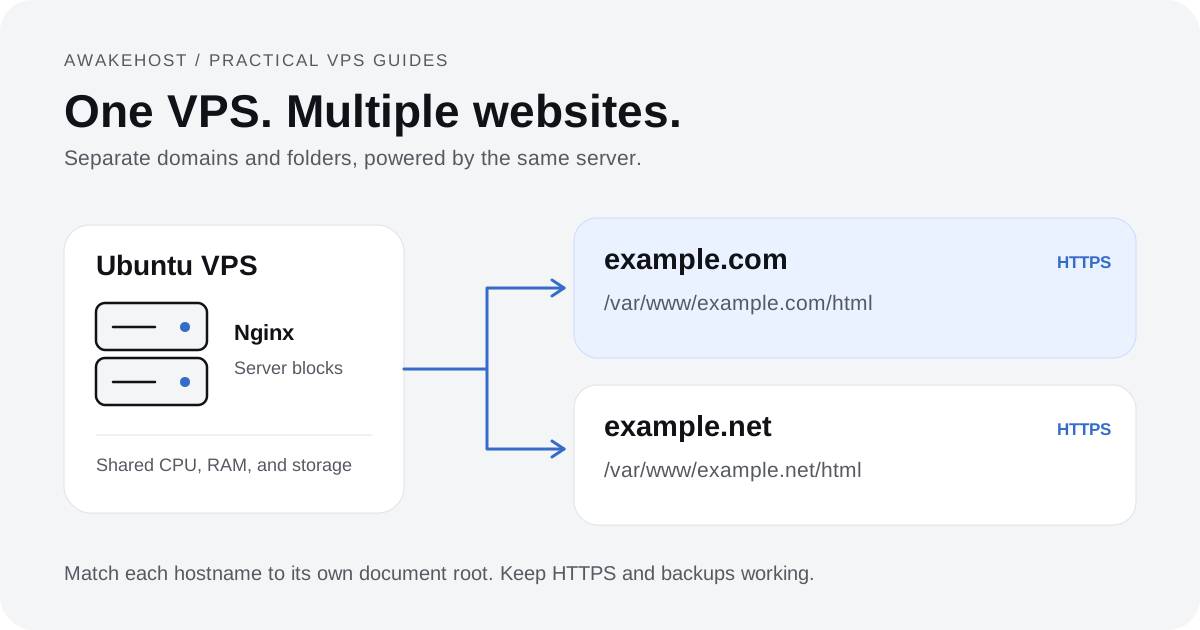
Compare AwakeHost VPS hosting plans to review available configurations, or talk to the AwakeHost team about your expected traffic and server requirements. If you run several domains, our multiple-websites VPS tutorial explains how to share one server while keeping site configurations separate.
Frequently Asked Questions
Is 1 TB bandwidth enough for 100,000 visitors?
It can be, but the number of visitors alone isn't enough to calculate usage. You need to know how many pages they load and how much data those pages transfer from your VPS. At an average of 5 MB per visitor session, 100,000 sessions would generate approximately 500 GB before additional traffic.
How many GB is 1 TB of VPS bandwidth?
For decimal calculations, 1 TB equals 1,000 GB. Some providers use binary measurements, so check how the allowance is defined and displayed in your hosting account.
Is 1 TB of bandwidth the same as 1 TB of storage?
No. Storage determines how much data you can keep on your server, while monthly transfer measures how much data moves across its network connection. A VPS with 25 GB of storage can still have a 1 TB monthly transfer allowance.
Does VPS bandwidth reset every month?
Monthly transfer allowances generally apply to a recurring billing or usage period. The reset date and treatment of unused transfer depend on the provider. Check the terms for your specific VPS plan.
Does higher bandwidth make a VPS faster?
Not necessarily. A larger monthly data transfer allowance doesn't automatically increase your network speed. Connection throughput is affected by the port speed, network conditions, and other factors. CPU, RAM, and application configuration also affect website performance.
Can I host multiple websites with 1 TB bandwidth?
Yes, if your VPS has enough resources. However, websites hosted on the same VPS generally contribute to that server's transfer usage. You need to calculate their combined traffic rather than treating 1 TB as a separate allowance for every domain.
Does Cloudflare reduce VPS bandwidth usage?
Cloudflare or another CDN can reduce origin bandwidth when it serves eligible cached content without fetching the response body from your VPS. Actual savings depend on caching rules, content types, and visitor requests. Dynamic and uncached requests may still reach your server.
Is unlimited VPS bandwidth really unlimited?
The term varies between providers. An unlimited or unmetered offer may still have connection-speed limits, acceptable-use restrictions, or other conditions. Review the plan terms to understand what is actually included.