Self-Hosted AI vs Cloud AI: Cost, Privacy and Infrastructure
Adding AI to a website is relatively easy. Keeping it affordable, private, and reliable as more people use it is where the difficult decisions begin.
You might start with a cloud AI API to power a customer support chatbot. A few months later, the application is processing thousands of requests, your monthly bill is growing, and customers are asking where their data goes.
That's when running your own AI model starts to look appealing.
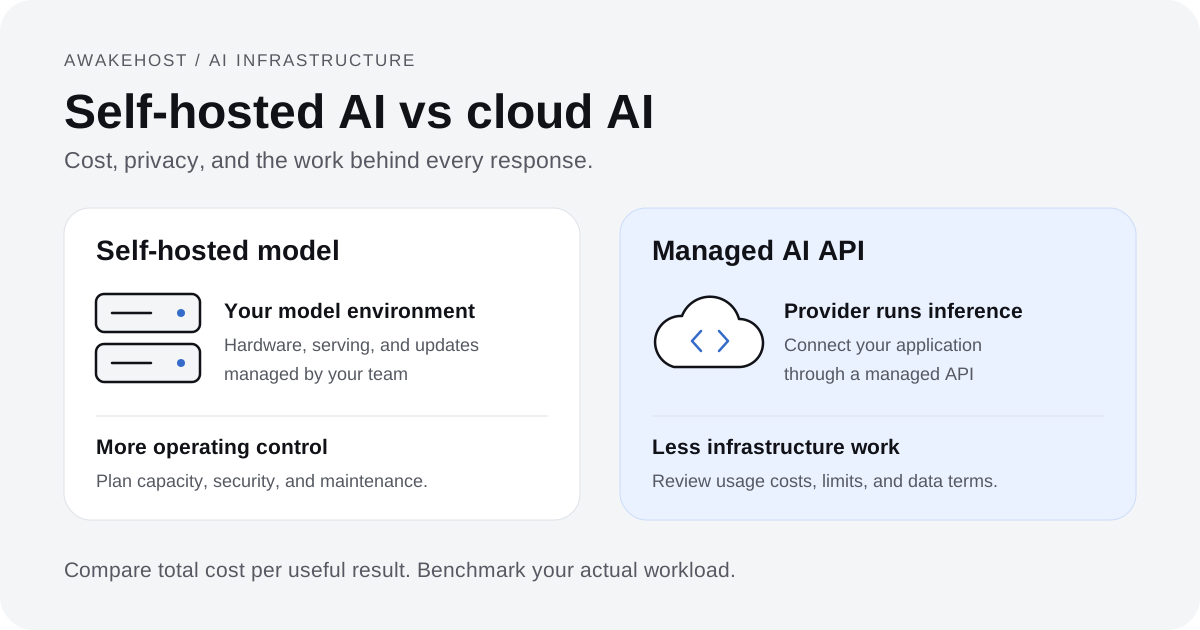
With self-hosted AI, you operate the model on infrastructure you control, whether that's a local machine, a dedicated GPU server, or rented cloud hardware. With a managed cloud AI service, another company runs the model and provides access through an API.
The main trade-off is straightforward: cloud AI reduces infrastructure work, while self-hosted AI gives you more control over the model and its operating environment.
Neither approach is automatically cheaper, faster, or more secure.
A startup with unpredictable traffic may spend far less using a managed API. A company processing large volumes of similar requests might benefit from dedicated inference infrastructure. An organization handling confidential records may have reasons to keep certain workloads within a tightly controlled environment.
The right choice depends on what your application does, how much traffic it receives, and who will maintain the system.
This guide compares self-hosted AI vs cloud AI across cost, privacy, hardware requirements, performance, and long-term maintenance.
What Is Self-Hosted AI?
Self-hosted AI means running and managing an artificial intelligence model within an environment you administer.
Instead of sending requests to a managed model API, you deploy the model yourself and make it available to your applications.
For example, a company could download a compatible open-weight language model, run it on a GPU-equipped server, and connect it to an internal document search application.
Employees would interact with the company's AI service rather than sending every request to an external model API.
A basic self-hosted AI setup might include:
- A server with sufficient CPU, RAM, and GPU memory.
- A language model whose license permits the intended use.
- An inference engine such as Ollama or vLLM.
- An API or application interface.
- Authentication, monitoring, and secure data storage.
You decide which model version to run, when to update it, and how applications connect to it.
You also become responsible for maintaining that environment. Our managed vs unmanaged VPS guide explains how to assess server administration responsibilities.
Does Self-Hosted AI Have to Run on Your Own Hardware?
No.
There are several ways to self-host an AI model.
On-premises hosting: You own or operate physical servers at your office, data center, or another controlled facility.
Rented GPU hosting: You lease a server with GPU resources and install your own model-serving software.
Private cloud deployment: You run a model within cloud infrastructure that your organization administers.
The second and third options still rely on an infrastructure provider, but you manage the inference software rather than purchasing access to a fully managed model API.
That distinction matters for privacy.
Running a model on a rented server gives you control over its configuration. It does not mean you own the physical infrastructure or eliminate every third-party access risk.
What Is Cloud AI?
Cloud AI commonly refers to managed AI services that let developers use models without operating the underlying inference servers.
Instead of configuring GPUs and loading model weights, you send requests to a provider's API and receive generated responses.
For example, a customer support application might submit a user's question to a managed language model and display the answer in a chat interface.
The AI provider operates the hardware, manages model deployment, and handles much of the infrastructure required to serve requests.
Popular managed AI services include APIs offered by OpenAI, Anthropic, Google, and other providers.
Cloud AI platforms may offer text generation, embeddings, image processing, speech recognition, and other capabilities.
Pricing depends on the service. Language model APIs commonly charge according to the number of input and output tokens processed.
An important distinction: Renting a GPU server from a cloud provider to run your own model is still self-hosted inference. The comparison in this article is mainly between managing your own model and using a managed AI API.
Self-Hosted AI vs Cloud AI: Key Differences
| Feature | Self-hosted AI | Managed cloud AI |
|---|---|---|
| Model deployment | Your responsibility | Provider handles deployment |
| Hardware | You supply or rent compute | Included in the service |
| Pricing | Infrastructure and operating costs | Usually usage-based |
| Data handling | Configured by your organization | Governed by provider terms and settings |
| Model choice | Compatible models you can deploy | Models available through the provider |
| Maintenance | Your team manages the environment | Provider manages underlying inference infrastructure |
| Scaling | Requires capacity planning | Usually easier, subject to service limits |
| Customization | More control over deployment and model configuration | Depends on available API features |
| Reliability | Depends on your infrastructure and operations | Depends on provider availability and your integration |
| Setup effort | Moderate to high | Usually low |
The differences become more meaningful when you examine actual operating costs.
Self-Hosted AI vs Cloud AI Cost: Which Is Cheaper?
Cloud AI often has a lower starting cost. Self-hosted AI can become financially attractive at sustained usage levels, provided the hardware can process the workload efficiently.
But comparing an API bill with a GPU rental price doesn't tell the whole story.
You also need to account for technical labor, availability, software maintenance, and the quality of the model you're running.
How Cloud AI Pricing Works
Many managed language model APIs charge separately for input and output tokens.
Input tokens represent the content sent to the model, such as a question, instructions, or retrieved documents.
Output tokens represent the content generated by the model.
A simplified monthly cost formula is:
API cost = (Input tokens ÷ 1,000,000 × Input rate) + (Output tokens ÷ 1,000,000 × Output rate)
Suppose your application processes:
- 40 million input tokens per month.
- 10 million output tokens per month.
For an illustrative API priced at $1 per million input tokens and $4 per million output tokens:
| Usage | Calculation | Monthly cost |
|---|---|---|
| Input | 40 × $1 | $40 |
| Output | 10 × $4 | $40 |
| Total | $80 |
These are hypothetical rates used to explain the calculation, not a quote for any particular API.
Actual prices vary considerably by provider, model, context length, processing tier, and optional features.
Some services also charge for image inputs, audio processing, tools, or stored context.
For a small application, paying only for usage can be considerably cheaper than keeping a GPU server running throughout the month.
How Self-Hosted AI Pricing Works
With self-hosted AI, you pay for the infrastructure and work required to operate the model.
That may include GPU rental or hardware purchases, storage, networking, system administration, monitoring, backups, and security.
Let's consider a hypothetical monthly budget:
| Expense | Monthly cost |
|---|---|
| GPU server rental | $350 |
| Administration and maintenance | $120 |
| Storage, backups, and monitoring | $30 |
| Estimated total | $500 |
Again, these are illustrative amounts rather than live GPU hosting prices.
Unlike token-based API pricing, some of these costs may remain relatively stable over a range of workloads.
But a rented GPU has a finite processing capacity.
As traffic increases, you may need additional GPUs, more memory, load balancing, or a second server for availability.
When Does Self-Hosted AI Become Cheaper?
Using the previous examples, the managed API costs $80 for a particular monthly workload, while the self-hosted environment costs $500.
At that level, the API is substantially cheaper.
Keeping the same token mix and illustrative API rates, API spending would reach $500 at approximately 6.25 times the original workload.
That is a mathematical cost crossover, not a guaranteed self-hosting break-even point.
Before treating it as one, you would need to confirm that the $500 server can handle the additional requests, meet your response-time targets, and run a model that performs well enough on the same tasks.
A smaller local model and a larger managed model may produce very different results.
You might save on inference costs but lose money through incorrect answers, failed automation, or additional human review.
The better comparison is the cost per successfully completed task, not simply the cost per million tokens.
Costs People Often Forget
Four expenses deserve particular attention.
Idle capacity: A rented GPU may continue generating charges even when nobody is using your application.
Engineering time: Someone must install the inference software, monitor performance, apply security updates, and troubleshoot failures.
Redundancy: If your application cannot tolerate downtime, you may need additional infrastructure rather than a single GPU server.
Model upgrades: Moving to a larger model or supporting longer conversations may require more memory and computing power.
Self-hosting can reduce dependence on API pricing, but it doesn't eliminate operating expenses.
Privacy: Is Self-Hosted AI Safer Than Cloud AI?
Privacy is one of the strongest reasons organizations consider self-hosted AI.
When you run a model within an appropriately isolated environment, you can control where prompts, uploaded files, generated responses, and application logs are processed and stored.
That can be valuable for internal documents, confidential business records, proprietary source code, or customer information.
However, self-hosting isn't automatically private.
A poorly secured AI server can expose sensitive information just as a poorly secured web application can.
The difference is that you have greater responsibility for preventing the exposure.
What Happens to Your Data With Cloud AI?
When your application uses a managed AI API, relevant request data is transmitted to the provider for processing.
Exactly how that information is stored, retained, or used depends on the service and its contractual settings.
It's incorrect to assume that every managed API uses customer data to train models.
For example, OpenAI states that API inputs and outputs aren't used to train its models by default unless the customer opts in. Its API documentation also describes retention controls and certain default abuse-monitoring logs.
Other providers offer their own privacy terms and enterprise data controls.
For business use, review the provider's actual documentation rather than relying on a general claim that cloud AI is either private or unsafe.
Questions worth asking include:
- Is customer content used for model training?
- How long are prompts and responses retained?
- Which employees or systems can access stored content?
- Where is the data processed?
- Are data residency controls available?
- Does the service offer an appropriate data processing agreement?
- Can your organization restrict or disable certain retention features?
These answers matter more than the provider's marketing language.
What Changes When You Self-Host?
A properly configured self-hosted model can process requests without sending the prompt content to a third-party model API.
You can keep model inference, document retrieval, and application data within your chosen environment.
However, the infrastructure provider may still have access or obligations at the hosting layer. Your applications may also send information to external logging, monitoring, analytics, or backup services.
Self-hosted AI systems can be compromised through weak credentials, exposed API endpoints, insecure dependencies, or vulnerable applications.
You need to protect the entire system, not just the model. Start with secure SSH access and a tested backup and recovery plan.
For sensitive workloads, implement appropriate network restrictions, encryption, access controls, audit logging, and data retention policies.
Also confirm whether the model-serving software makes external requests, including telemetry, downloads, and updates.
Does Self-Hosting Guarantee Regulatory Compliance?
No.
Running an AI model locally or on a private server does not automatically make an application compliant with GDPR, HIPAA, or other privacy requirements.
Compliance depends on what information you process, who can access it, where it is stored, and which legal and organizational controls apply.
A healthcare organization, for example, may have obligations involving patient information that extend far beyond the AI model itself.
Self-hosting gives you more control over some technical decisions. Your organization still needs to demonstrate that its handling of sensitive information meets applicable requirements.
What Infrastructure Do You Need to Self-Host AI?
The biggest infrastructure question is whether your selected model can run efficiently on the available hardware.
For ordinary websites, server sizing often starts with CPU, RAM, and storage.
For large language model inference, GPU performance and available memory can be decisive.
CPU vs GPU for AI Inference
A CPU can run certain AI models, including smaller quantized language models.
For development, testing, or low-volume tasks, CPU inference may be sufficient.
But language model generation involves substantial mathematical computation. GPUs are often much better suited to serving larger models or handling multiple requests concurrently.
Consider a customer support chatbot.
If one employee occasionally submits a question to a small model, a CPU-only setup might be acceptable after testing.
If hundreds of website visitors expect quick answers at the same time, a CPU-only VPS may struggle to meet the required response times.
A virtual CPU allocation is not equivalent to dedicated GPU processing power.
How Much RAM or GPU Memory Does an AI Model Need?
Model memory requirements depend on several factors:
- The number of model parameters.
- The numerical precision used for model weights.
- The context length.
- The number of simultaneous requests.
- The inference engine and model architecture.
A technique called quantization can reduce memory requirements by storing model weights at lower precision.
For example, an 8-billion-parameter model stored at four bits per parameter would require approximately 4 GB for the raw weights alone.
That's not the total memory required to run it.
The inference engine also needs memory for temporary calculations, runtime operations, and the key-value cache used during generation.
Longer prompts and more concurrent users can increase those requirements.
Similarly, a 70-billion-parameter model stored at four bits would require approximately 35 GB for raw weights before accounting for additional memory overhead.
These calculations help estimate the scale of a deployment, but they aren't minimum hardware specifications.
Actual requirements must be checked against the selected model and inference software.
Can You Run an AI Model on a Regular VPS?
Yes, for certain workloads.
A CPU-based Linux VPS can be useful for testing small models, running lightweight inference tasks, or experimenting with local embeddings when performance requirements are modest.
It can also host the application surrounding your AI model.
For example, a VPS might run:
- Your chatbot's web interface.
- An API backend handling user authentication.
- A database containing application records.
- A vector database for document retrieval.
- Background workers processing requests.
- The connection to a separate GPU inference server or managed AI API.
These supporting components don't necessarily require a GPU.
An ordinary CPU VPS should not be confused with a dedicated GPU server. If your application needs high-throughput language model inference, confirm actual GPU availability, VRAM, and benchmark performance before selecting hosting.
What Software Is Used for Self-Hosted AI?
You don't always need to develop your own model-serving system.
Several established tools can help you run existing models.
Ollama
Ollama is commonly used for running supported language models locally and on servers.
It can be a convenient choice for development, model evaluation, and smaller internal applications.
Its model management and local API make it accessible to developers who want to experiment without building an inference stack from scratch.
Ollama can use supported GPU hardware and can also run certain models on CPUs.
Performance depends on the selected model and system.
vLLM
vLLM is designed for language model inference and serving, including workloads where batching, throughput, and memory management are important.
It supports HTTP interfaces compatible with various OpenAI-style API requests.
That can make it useful when integrating a self-hosted model into applications built around common API conventions.
However, a model-serving API still requires production security.
For example, the vLLM documentation warns that its built-in API-key option doesn't protect every exposed endpoint. A production deployment should use appropriate network isolation and a properly configured access-control layer.
Other Parts of the AI Stack
A production application may also need an API framework, reverse proxy, authentication service, database, monitoring system, and request queue.
If you're building document-based AI search, you may need an embedding model and vector database as well.
These components create infrastructure requirements beyond simply loading the language model into memory.
You should also review the model's license before using its weights commercially. Publicly downloadable models do not all grant the same rights.
Performance: Which Option Is Faster?
Neither self-hosted AI nor cloud AI is automatically faster.
Performance depends on model size, GPU hardware, network latency, request length, concurrency, and the quality of the inference setup.
A small self-hosted model may respond quickly to short requests on suitable hardware.
A larger managed model might take longer on some tasks but produce more useful answers.
The opposite can also happen if the managed provider operates much more powerful inference infrastructure.
Four Performance Metrics That Matter
Time to first token: How long users wait before the model starts producing a response.
Output speed: How quickly the model generates text, usually measured in tokens per second.
Throughput: How many requests or tokens the system can process over time.
Tail latency: How long slower requests take, often measured using the 95th-percentile response time (p95).
These measurements tell you more than a claim that a particular GPU or AI service is fast.
For example, a self-hosted model might handle one user comfortably but slow down significantly when twenty people submit requests together.
Increasing GPU memory alone may not resolve every performance problem. You also need to consider compute capability, batching, context length, and the inference engine.
Does Hosting AI Closer to Users Reduce Latency?
Sometimes.
Locating your application and model infrastructure close to your users can reduce network travel time.
However, a nearby server running a model slowly may still deliver worse overall response times than a distant, highly optimized cloud inference service.
Measure the full request path, including authentication, document retrieval, model processing, and response delivery.
For AI applications, model processing time often matters more than a small difference in network latency.
Scalability and Reliability: Who Handles Growth?
Cloud AI APIs usually make it easier to begin serving more users without directly managing GPU capacity.
You still need to account for provider rate limits, quotas, service availability, and application-level retry behavior.
But you generally don't have to purchase and configure a new inference server when traffic increases.
With self-hosted AI, scaling becomes your responsibility.
You may need to add GPUs, distribute requests across multiple workers, expand storage, or introduce a load balancer.
You also need to decide what happens when the inference server becomes unavailable.
If your entire AI application depends on one GPU instance, that server represents a single point of failure.
For an internal tool used by a small team, that may be an acceptable compromise.
For a paid SaaS product promising high availability, it may not be.
Why GPU Utilization Matters
Suppose you rent a GPU server and leave it running all month.
If your application only uses the GPU for an hour each day, you're paying for substantial idle capacity.
A usage-based cloud API may be more economical.
If your application keeps the GPU busy throughout the day with predictable traffic, dedicated inference hosting becomes more attractive.
The objective isn't necessarily to keep utilization at 100%. You need enough spare capacity to handle request bursts and meet response-time targets.
The useful measure is how much work the server completes at an acceptable cost and latency.
Self-Hosted AI vs Cloud AI: Which Works Best for Your Application?
Different workloads place different demands on cost, privacy, and infrastructure.
1. Customer Support Chatbots
For a website receiving a modest number of AI support requests, a managed API is often the easier starting point.
You can launch quickly, pay according to usage, and avoid maintaining an inference server.
If the chatbot later receives substantial, predictable traffic, you can evaluate a self-hosted model against your actual support questions.
Measure whether it answers correctly, follows your instructions, and handles conversations involving several messages.
A cheaper model that gives unreliable support answers may create additional work for your team.
2. Internal Document Search
A company might want employees to ask questions about policies, product documentation, or internal procedures.
This can be built using retrieval-augmented generation (RAG).
RAG retrieves relevant passages from a document collection and supplies them as context to a language model.
You can host the document storage, retrieval system, and AI model within your own controlled environment.
Alternatively, you can maintain a private document index and use a managed model API to generate answers.
However, when retrieved document passages are sent to a cloud model, those passages leave your application environment for processing.
Keeping the vector database private does not, by itself, prevent sensitive document content from reaching the external API.
Decide which information is permitted to cross that boundary.
3. AI Features in SaaS Applications
Startups developing AI-powered features often benefit from managed APIs during early development.
They can validate customer demand without committing to substantial infrastructure costs.
Suppose your application uses AI to summarize support tickets.
Before deploying a dedicated inference server, measure how many tickets are processed, how long the average prompt is, and what customers expect from the output.
If usage grows steadily, you can test whether a smaller self-hosted model handles the same task at lower total cost.
The important step is benchmarking your real workload.
4. High-Volume Document Processing
Businesses processing large numbers of invoices, reports, or other standardized documents may find self-hosting attractive.
These workloads are often more predictable than public-facing chatbots.
If the model handles a narrow task well and the request volume keeps a GPU busy, fixed infrastructure costs may become easier to justify.
However, the comparison must include document extraction, preprocessing, quality checks, and any human correction required.
An inexpensive inference operation is not valuable if its results create expensive downstream errors.
5. Applications Handling Sensitive Data
Organizations processing confidential information may prefer a deployment model with tighter control over data access and storage.
That could involve on-premises hardware, a private cloud environment, or a managed enterprise AI service with suitable contractual protections.
The right choice depends on the organization's security requirements.
Self-hosting may provide greater technical control, while an enterprise cloud service may reduce the amount of infrastructure the organization must maintain.
Neither removes the need for proper access control, monitoring, and legal review.
Hybrid AI: Combining Self-Hosted Infrastructure With Cloud Models
There is a third option that often makes sense.
You don't have to run every AI component yourself or send every task to a managed provider.
A hybrid architecture separates the application infrastructure from the model inference service.
For example:
| Component | Possible hosting arrangement |
|---|---|
| Website and user dashboard | Standard VPS |
| Backend API | Standard VPS |
| User accounts and billing | Application database on a VPS |
| Document retrieval | Private database or vector store |
| Routine model inference | Self-hosted GPU service |
| More demanding model requests | Managed cloud AI API |
| Monitoring and request routing | Your application infrastructure |
This setup allows you to choose where each task runs.
A simple classification request could go to a smaller self-hosted model, while a more difficult request could be routed to a managed service when permitted by your data policy.
Not every application needs this arrangement. Routing systems introduce additional complexity, and maintaining two inference paths can increase testing and monitoring work.
But hybrid hosting can be useful when your requirements vary across workloads.
Where a VPS Fits Into the Architecture
A VPS can serve as the control and application layer for an AI product.
It might handle user authentication, API requests, database queries, background processing, and communication with the inference service.
That lets you keep the application independent of the particular model provider.
For example, you could begin with a managed AI API and later connect the backend to a compatible self-hosted inference endpoint.
You would still need to account for model-specific features, request formats, and output differences.
The advantage is architectural flexibility, not a guarantee that switching models will require no development work.
How to Choose the Right AI Hosting Approach
Before committing to infrastructure, answer five questions.
1. How Many Requests Will the Application Process?
Estimate daily requests, monthly token usage, and peak simultaneous users.
A few hundred requests each day create a different cost profile from a service handling thousands of requests every hour.
2. How Sensitive Is the Data?
Identify what information enters the model.
Consider customer records, personal information, confidential documents, and proprietary source code.
Then establish what data may be transmitted to external services and which controls are required.
3. What Model Quality Do You Need?
Test representative tasks against the models you're considering.
A smaller open-weight model may be sufficient for classification or basic summarization.
It may not perform as well as a more capable managed model on complex reasoning or specialized tasks.
Use consistent test data and evaluate actual output quality rather than relying exclusively on public benchmarks.
4. Who Will Maintain the Servers?
Running a model requires more than installing Ollama or vLLM.
You'll need someone responsible for monitoring, updates, access security, backups, incident response, and capacity planning.
If your team cannot support that workload, include external administration costs in your calculations.
5. Can the System Grow With Your Application?
Think beyond the first deployment.
Will you need a larger model, longer context windows, more simultaneous users, or improved availability?
The infrastructure you choose should accommodate your likely next stage without forcing unnecessary spending today.
Common Mistakes When Choosing AI Infrastructure
The most expensive mistakes often happen before the first model is deployed.
Assuming self-hosted AI is free. Downloadable model weights may have no purchase price, but the hardware, storage, and engineering time still cost money.
Choosing a VPS based on RAM alone. A server with 64 GB of system RAM isn't equivalent to a server with 64 GB of suitable GPU memory.
Ignoring model quality. A lower inference cost doesn't automatically mean a lower cost per useful result.
Sending sensitive documents to external APIs without reviewing data policies. Training permissions, retention, access, and processing locations are separate issues.
Exposing an inference API directly to the internet. Model-serving endpoints need authentication, network controls, request limits, and monitoring.
Buying dedicated GPU capacity too early. An application with irregular traffic may spend most of its time paying for an idle server.
Assuming every open-weight model allows unrestricted commercial use. Model licenses vary, and some impose conditions on deployment or redistribution.
Avoiding these mistakes can matter more than choosing the newest model or the largest GPU.
Building AI Applications With AwakeHost VPS Hosting
Not every AI application needs a GPU on the same server as its website.
Many applications use ordinary Linux infrastructure for their frontend, backend, databases, and integrations while relying on a separate service for model inference.
This is where a VPS can be useful.
AwakeHost offers KVM VPS hosting with configurable CPU, RAM, storage, and server locations. These resources can support the application components surrounding an AI model.
For example, you could use a Linux VPS to host a chatbot backend, manage API credentials, run scheduled processing jobs, or maintain a database for your AI application.
The model itself could run through a managed cloud API or on separate GPU infrastructure.
AwakeHost's standard VPS configurations should not be assumed to include dedicated GPU resources. If you want to run a larger language model locally, confirm the hardware requirements and availability of a suitable inference server first.
You can explore AwakeHost VPS hosting to compare available CPU, memory, storage, and locations for your application backend.
Separating the application layer from inference can also make it easier to change models or providers as your project grows.
Final Verdict: Self-Hosted AI or Cloud AI?
For most developers launching a new AI feature, a managed cloud API is the more practical starting point.
It allows you to test the product, understand customer behavior, and measure actual token usage before investing in dedicated model-serving infrastructure.
Self-hosted AI becomes more attractive when you have predictable usage, suitable hardware, sufficient technical expertise, or privacy requirements that favor greater control over model processing.
But the decision shouldn't come down to cost alone.
A production AI system must produce useful answers, meet performance requirements, protect data, and remain available when users need it.
A managed API may cost more per unit of inference while reducing operational responsibilities. A self-hosted model may give you greater control but introduce engineering and infrastructure expenses.
For many businesses, the most practical arrangement is a hybrid one: keep the application and supporting services on infrastructure you manage, then choose the most appropriate inference service for each workload.
The best AI infrastructure is the one that meets your application's requirements at a total cost you can sustain.
If you're building an AI-powered website, chatbot, or SaaS product, compare AwakeHost VPS hosting options for your application backend before deciding how to deploy the model itself.
Frequently Asked Questions
Is self-hosted AI cheaper than cloud AI?
It can be cheaper for sustained, predictable workloads if the selected model performs adequately and your infrastructure is used efficiently. Cloud AI is often cheaper for low-volume or irregular usage because you don't need to maintain dedicated inference hardware.
Can I run AI models on a VPS without a GPU?
Yes. Some small or quantized models can run on CPU-based VPS servers. However, response speed and concurrency may be limited. Larger language models and production workloads often benefit from dedicated GPU resources.
Is self-hosted AI more private than using an API?
Self-hosting can provide greater control over where prompts, documents, and model outputs are processed. However, privacy still depends on your security configuration, hosting provider, connected services, and data-handling practices.
Do cloud AI providers use customer data to train models?
Policies differ by provider and service. Some business APIs do not use customer inputs and outputs for training by default, while other offerings may have different rules. Always review the applicable data usage and retention documentation.
What is the difference between self-hosted AI and on-premises AI?
Self-hosted AI means you operate the model-serving environment. It may run on rented infrastructure or your own hardware. On-premises AI specifically refers to systems hosted within infrastructure operated at an organization's own premises or facilities.
How much GPU memory do I need to self-host an LLM?
It depends on the model's parameter count, precision, context length, and concurrency requirements. Quantization can reduce model-weight memory, but inference also requires memory for runtime operations and the key-value cache. Test the selected model before purchasing hardware.
Can I use Ollama or vLLM on a cloud server?
Yes, if the server meets the software and hardware requirements. A GPU-equipped cloud server can run self-managed inference tools. Some smaller models can also run on CPUs, with performance depending on the workload.
Is a dedicated GPU necessary for every AI application?
No. Websites that use managed AI APIs don't need local GPUs. A regular VPS can host the frontend, backend, database, and supporting services while another provider handles model inference.
Can I switch from cloud AI to self-hosted AI later?
Yes, but the amount of work depends on your application. API-compatible inference tools can reduce integration changes, although different models may behave differently and support different features. Test functionality, output quality, and performance before migrating production traffic.
What is the best approach for a startup building its first AI product?
For many startups, beginning with a managed API is sensible because it reduces setup time and fixed costs. Once actual usage, model requirements, and customer expectations are clear, the business can evaluate self-hosted or hybrid inference using measured costs and performance.